
Stop Underestimating What Subscriptions Cost You
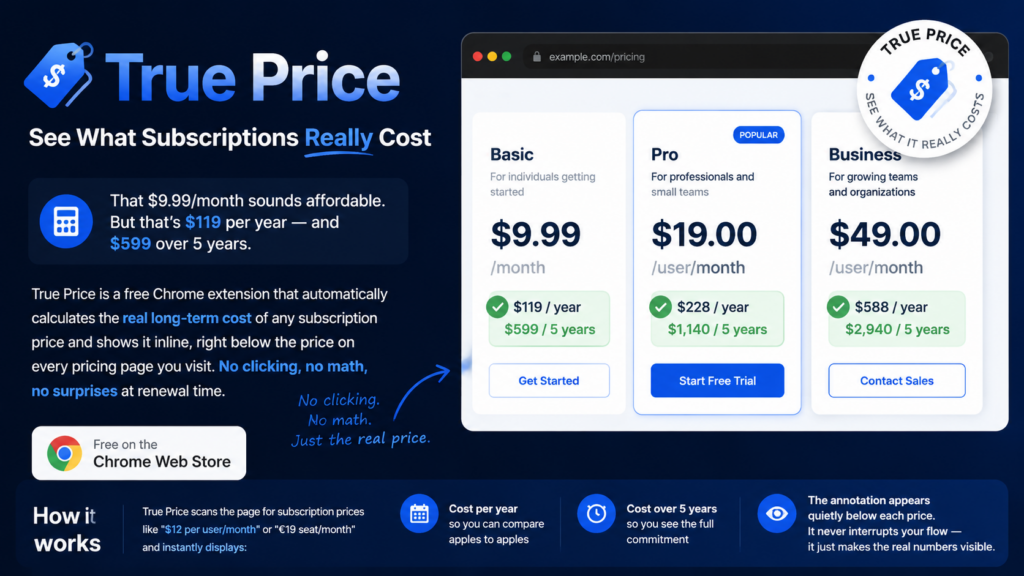
True Price is a free Chrome extension that shows the real yearly and 5-year cost of any subscription — instantly, inline, on every pricing page.
The problem with monthly pricing
Every SaaS company knows that “$12/month” converts better than “$144/year.” It’s not deceptive — but it is designed to make costs feel smaller than they are.
For an individual, that one tool is fine. But the average knowledge worker subscribes to 8–12 software tools. At $15/month each, that’s $1,440–$2,160 per year — and over $7,000 over five years.
For teams and businesses, the numbers multiply fast.
What True Price does
True Price is a lightweight Chrome extension. Install it once, forget about it. Every time you land on a pricing page, it:
- Detects subscription prices automatically (monthly, yearly, per seat, quarterly, weekly)
- Calculates the true annual and 5-year totals
- Displays a small green card directly below each price
No settings to configure. No accounts. No friction.
Who it’s for
- Freelancers and solopreneurs comparing tools on a budget
- Finance and ops teams evaluating software spend
- Startup founders keeping SaaS costs visible before committing
- Anyone tired of being surprised by renewal invoices
Privacy by design
True Price never leaves your browser. It reads visible page text to find prices. It does not transmit anything, log anything, or know who you are. Your on/off preference is the only thing it saves — locally, on your own device.
True Price — Privacy Policy
True Price (“we”, “our”, “the extension”) is a browser extension published by Cubexic that helps you see the real long-term cost of subscription prices. When you visit a pricing page, it detects prices such as “$9.99/month” or “€12 seat / month” and displays yearly and 5-year totals inline below each price.
This Privacy Policy explains what the extension does, why it needs certain browser permissions, what information it handles, and your rights. By installing or using True Price, you agree to this policy.
1. Information we collect
We do not collect personal information. True Price does not operate servers, accounts, analytics, advertising networks, or any backend that receives data from your browser.
We do not collect, store remotely, sell, rent, or share:
- Your name, email address, or contact details
- Browsing history or a list of sites you visit
- Page content beyond what is processed locally on your device
- Financial or payment information
- Authentication credentials or form field contents
- Location data
- Device identifiers for tracking purposes
2. Information stored on your device
The extension stores one preference using Chrome’s
chrome.storage.sync API:
- enabled — whether annotations are turned on or off (default: on)
This setting is saved on your device and may sync across your signed-in Chrome browsers if you use Chrome Sync. We do not have access to this data. You can remove it by uninstalling the extension or clearing extension storage in your browser settings.
3. How the extension processes page content
To find subscription prices, True Price reads visible text in the web pages you open while the extension is enabled. Processing happens entirely in your browser. Matching text is used only to calculate and display inline annotations (per-year and 5-year estimates).
The extension does not:
- Transmit page content to us or any third party
- Log URLs, page text, or annotations remotely
- Read passwords, credit card fields, or other sensitive form inputs
- Modify page content except to insert its own inline cost labels
- Track you across websites for advertising or profiling
4. Why broad host access is required
Google Chrome may flag True Price for “broad host permissions” because the
extension’s content script is declared with <all_urls>. We
understand this is a sensitive permission. Below is why it is necessary for this
product, and why narrower alternatives do not achieve the same user benefit.
4.1 Why we cannot list specific websites only
Subscription pricing appears on thousands of independent domains — SaaS tools, productivity apps, CRM platforms, streaming services, and more. There is no fixed list of hosts that would cover where users encounter prices. Restricting the extension to named sites would cause it to fail on most pricing pages users visit, defeating its single purpose.
4.2 Why activeTab alone is not sufficient
Chrome’s activeTab permission grants temporary access to the
current tab only after an explicit user gesture (for example, opening
the extension popup). True Price already uses activeTab for one
specific action: reloading the active tab when you toggle annotations on or off.
However, activeTab does not allow the extension to
automatically annotate prices when you navigate to a pricing page without clicking
the extension each time. Because users expect annotations to appear passively as
they browse, the extension must be able to run its local price-detection logic on
pages as they load. That requires host access beyond a single user gesture.
4.3 What <all_urls> is used for
The content script runs locally in your browser to:
- Scan visible text for subscription price patterns
- Calculate yearly and 5-year totals on your device
- Insert small inline labels below matching prices
No data leaves your browser as a result of this access. The permission is used solely to deliver the extension’s single, documented purpose.
4.4 Minimising access in practice
Even with broad host access, True Price is designed to minimise what it touches:
- It skips hidden text, scripts, styles, form fields, and code blocks
- It annotates at most one price block per pricing card or column
- It ignores discount-only lines (e.g. “$10 off / month”) when a real price exists
- It does not run network requests or load remote code
- You can disable all annotations instantly from the extension popup
5. Permissions explained
- storage — Saves whether annotations are enabled (on/off).
- activeTab — When you open the popup and toggle annotations, reloads the currently active tab so changes take effect immediately. No other tabs are accessed.
- Content script (all URLs) — Allows local, on-device detection of subscription prices and injection of inline annotations on pages you visit while the extension is enabled. Required because pricing pages exist across many domains and annotations must appear without requiring a click on every page.
True Price does not request the tabs,
history, cookies, webRequest, or
identity permissions.
6. Remote code
True Price does not use remote code. All JavaScript and CSS are
bundled inside the extension package. The extension does not download, load, or
execute scripts from external servers, and does not use eval() or
similar dynamic code execution.
7. Third parties
We do not use analytics, advertising, crash reporting, or third-party SDKs. No third party receives data from True Price.
8. Google Chrome Web Store & Limited Use
If you install True Price from the Chrome Web Store, Google’s terms and privacy policies also apply to your use of Chrome. True Price’s use of Chrome permissions and any information received through Chrome APIs complies with the Chrome Web Store User Data Policy, including the Limited Use requirements:
- Data accessed via Chrome APIs is used only to provide the extension’s stated functionality
- Data is not sold to third parties
- Data is not used for unrelated purposes such as advertising or credit decisions
- Data is not transferred to third parties except as necessary to provide the extension’s core function (which, for True Price, does not apply — we transfer nothing)
9. Data retention
We retain no user data on our servers because we operate no servers for this extension. The on/off preference persists only in your browser until you change it or uninstall the extension.
10. Security
Because True Price does not collect or transmit personal data, there is no remote datastore to breach. All price detection and annotation logic runs locally in your browser using the extension’s packaged files.
11. Children’s privacy
True Price is not directed at children under 13, and we do not knowingly collect information from children.
12. International users
True Price is designed to work globally. Because processing occurs on your device and we do not collect personal data, no cross-border transfer of personal information by us takes place.
13. Your choices
- Turn off annotations — Use the toggle in the extension popup
- Stop all access — Uninstall the extension from Chrome
- Clear stored preference — Remove extension data in browser settings or uninstall
14. Changes to this policy
We may update this Privacy Policy from time to time. Changes will be posted at this URL with an updated “Last updated” date. Continued use of the extension after changes constitutes acceptance of the revised policy.
15. Contact
Questions about this Privacy Policy or True Price:
[email protected]